Woke up this morning and realized it was absolutely beautiful. So the wife and I drove down to the B&A (She still is uncomfortable on the roads), parked the car and headed south along the B&A. We made it to a cute little coffee shop that sits right next to the trail, grabbed some coffee and sat on their back deck to enjoy it.
After that we returned back to the car and stopped at Panera for lunch. Unfortunately, I am now sitting at work and probably will be for another 4 hours. :/
And with today being the last day of the July150, I am proud to say I ended up with 165 miles. Not bad considering how few days I actually rode. I am shooting for 400 for August, which should motivate me to get out and ride right from the start. I made it a "goal" on Garmin Connect, so I am excited to see how that works!
Saturday, July 31, 2010

Thursday, July 29, 2010
So this is what it looks like when you press "Start/Stop" instead of "Lap"
Got a side cramp on the jog out, walked back. I did try a sprint there at the end just to see how fast I could actually move. ~11-12 mph. I can't believe people can run that fast for an entire marathon.
Wednesday, July 28, 2010
Lunch jog
Well, decided to go for a jog at lunch. Not much to report. The Forerunner 305 is a freaking awesome device and the transition to jogging with it was simple. Navigate the menu to switch from Cycling to Running (three button presses) and the screen then showed my Time, Pace (minutes per mile), Heart Rate, and Distance. The distance started out in feet then switched to miles at the 0.5 mile mark.
I only jogged two miles today. A warm-up walk to the road I jog on, a mile jog, a small walk to stretch, a mile jog, then the cooldown walk back to work. These were easily distinguished via the Lap button on the face of the watch. Whenever I got to a new transition, I just hit the lap button and it logged that location to monitor.
I have to admit I wasn't really in the mood to run and it can show with the speed. I am beginning to question my abnormally high heart rate a little bit more. I have my cardiologist appointment coming up somewhat soon and I am looking forward to discussing my fitness with my cardiologist. I haven't seen him since I took up biking last year and he has never ever seen me after running.
I only jogged two miles today. A warm-up walk to the road I jog on, a mile jog, a small walk to stretch, a mile jog, then the cooldown walk back to work. These were easily distinguished via the Lap button on the face of the watch. Whenever I got to a new transition, I just hit the lap button and it logged that location to monitor.
I have to admit I wasn't really in the mood to run and it can show with the speed. I am beginning to question my abnormally high heart rate a little bit more. I have my cardiologist appointment coming up somewhat soon and I am looking forward to discussing my fitness with my cardiologist. I haven't seen him since I took up biking last year and he has never ever seen me after running.
Monday, July 26, 2010
Crabbin!
(And yes, Kungfoo, this is ripped from knightly)
Sunday I went crabbin. Unfortunately, due to my old high school buddy being a dumbass and not showing up, it was just me and one other friend. We didn't get out to the docks until about noon... which is not only the worst time to go crabbing (mid day) but also the damn hottest. And we had to deal with a full dock, so we could only place a half dozen chicken neck lines. :( We only lasted an hour before we were completely dehydrated and called it a day.
We caught about a dozen crabs, though only 5 of them were keepers. So... here are some pics of the cooking!


And yes, they were delicious. The third and fourth shows the seasoning... a mixture of Old Bay and J.O. Seasoning.
We think we are going to make this a weekly thing. $6 to get into the park and if we get there early I am sure we can catch a few dozen.
Sunday I went crabbin. Unfortunately, due to my old high school buddy being a dumbass and not showing up, it was just me and one other friend. We didn't get out to the docks until about noon... which is not only the worst time to go crabbing (mid day) but also the damn hottest. And we had to deal with a full dock, so we could only place a half dozen chicken neck lines. :( We only lasted an hour before we were completely dehydrated and called it a day.
We caught about a dozen crabs, though only 5 of them were keepers. So... here are some pics of the cooking!


And yes, they were delicious. The third and fourth shows the seasoning... a mixture of Old Bay and J.O. Seasoning.
We think we are going to make this a weekly thing. $6 to get into the park and if we get there early I am sure we can catch a few dozen.
Thursday, July 22, 2010
The $21M Photo + July 15 done
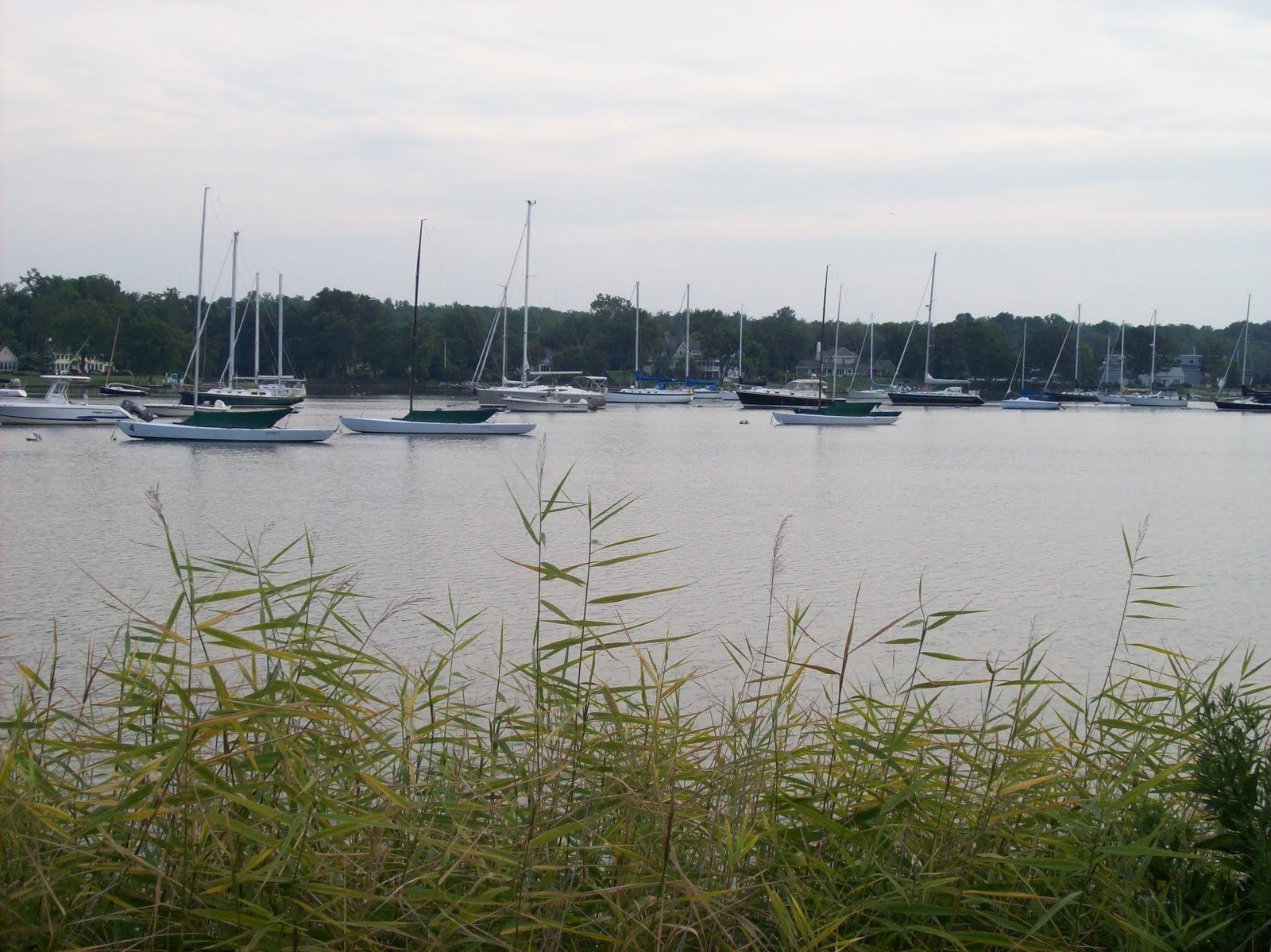
Decided today to head on out to Gibson Island. Left home at 6:30-ish. Gibson Island is a small little island on the Chesapeake Bay. Strangely enough, it is the #12 most expensive zip code to live in in the entire United States. It is a gated community, so I couldn't even make it there... and the road signs pointed it out quite clearly.

And as you approach it, the smell of water is great. Truth be told, I have really shown very few photos of the bay, considering the title of this blog is "Biking the Bay". So here is the Bay Bridge (along with the road that takes you onto Gibson Island:

The guard tower is just slightly to the right. I actually got yelled at for taking that picture... he thought I was photographing one of his precious residents. Anyways... I titled this the $21M dollar photo...so here it is.

Doesn't look all that impressive, right? Just a picture of 7 houses. Well, considering the average price of a house on the island is over $3 million dollars... that right there is a picture of $21 million dollars.
Anyways... I did 29 miles tonight, which officially puts me over the July 150 challenge. So yay for that!
But now a question for you all. According to my garmin, I burned 1593 calories on this ride. I am exhausted. I was equally as exhausted yesterday. My guess is it has to do with my food intake. I haven't changed my eating habits in years. I eat for breakfast(throughout the course of the morning until lunch) some greek yogurt, a banana, and a bit of cheese. For lunch I have a sandwich of either turkey or salami on wheat bread with cheese, tomato, and onion, an apple and some grapes. Dinners usually vary, but some meat and carbs. I don't know. I think I need to get some more food in me. Haha, or I'm just weak and looking for excuses for tiredness.
Riding up to the BWI Loop
I headed out last night for a ride back up the B&A. Like I mentioned in a previous post, I don't very much enjoy the northern side of the B&A. I was planning on turning around where the B&A dead ends, but about 100 yards before there some punk ass decided to play chicken with me. I was barreling down at a semi-brisk pace and this guy, riding a kid's bike, stayed on my side of the path while coming at me. I yelled at him to move over, but he just stared at me. At the last second I bunny hopped off the side of the path and turned around. He stopped and stared me down. Fuck it... so I just kept on going. I decided a run in with him probably wasn't the smartest idea, so I kept on riding to the BWI loop. I turned around right at where it "started", and headed on back home via East/West. Not wanting to get caught inside Kinder Farms, I didn't do that and was back home in no time.
On an unrelated note, somebody deleted my data for the July 150, so I had to re-input it all again. Glad I've been keeping track1
On an unrelated note, somebody deleted my data for the July 150, so I had to re-input it all again. Glad I've been keeping track1
Tuesday, July 20, 2010
Garmin Forerunner 305
After spending some time looking at different GPS devices, I decided the best idea for me would be to go with the Forerunner 305. Considering I've been running as well, it made sense for me to get something that would easily transition between running and biking. And, in my opinion, the Forerunner 305 is the best bang for the buck.
The Forerunner 305 comes packaged with a heart rate monitor (which sells for $60 alone) and for extra cash, you can purchase the Cadence/Speed adapter.
I purchased it from Best Buy for a total of $154 after taxes. In the box is the actual GPS unit, a usb to mini-usb cable, a mount for charging/uploading, the power supply (which is connected to the mount via the usb cable), the heart rate monitor, and the paperwork and software.
I let it sit on the charger for four hours before pulling it off. The recommended charging time was three hours, but I never got a "Charging Complete" message so I was hesitant to pull it off. That being said, after scouring through the documentation, I don't think there is said warning... so I think I am safe. Unfortunately, by that time it was too late to take it for a run so I simply configured it.
The configuration was incredibly easy. You turn it on by holding down a button on the side and then you go through simple questions. "Do you own a heart rate monitor?" "Do you own a foot pad?" "Do you own a cadence?" "What is your age/weight/sex?" etc.
All in all, the setup took about 45 seconds before I could have been using it. Unfortunately, by that time it was 10:45 at night, so I couldn't do much else.
This morning, however, I worked on the configuration screens.
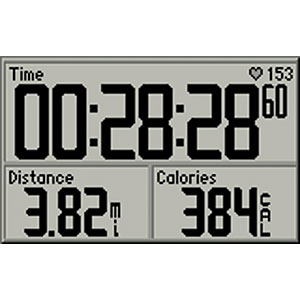
You can choose how many data sets are on the screen, up to four. For biking I chose Time, Speed, Distance, and heart rate. You can configure more screens, (Up to 5 I believe), so if I wanted to also see what my max speed, lap speed, lap time, etc. was, I could configure those for a different screen, at which point pressing the up or down arrows on the side of the unit would take me to those screens.
I strapped the heart rate monitor on this morning and off I went for a small little ride. I wanted to make it back with plenty of time to download the software and upload my ride.
Satellite acquisition took about 45 seconds, which was exactly how long it took me to lock my front door, put my keys away, walk my bike down the stairs and check to see the satellite status. (It is a progress bar that, when filled, means you have satellites). Reading about the product on various other reviews have stated that after awhile, the satellites pick up faster if you stay in the same general area (i.e. not going to a different state). To start recording you simply hit the Start/Stop button on the device.
While riding it was great. I didn't purchase the bike mount, so I simply wore it on my wrist. Surprisingly, I didn't even notice it. I'm not gonna lie, the device is rather large. The screen is the width of two fingers and about an inch (2.34 cm) long. The whole unit is probably double that size.
But, what makes that good, is that you can actually read the damn thing. A quick glance up and I know how far I've gone, how long it has taken, what speed I am going, and what my heart rate is.
Once I got back home, I simply hit the start/stop button and took it off.
Downloading the software was a breeze. It comes packaged with Garmin's home made tracking tool which auto-detects any rides/runs you have done and uploads them. But I wasn't that interested in that... I wanted to check out Garmin Connect.
So I went to Garmin Connect, registered, downloaded a plugin, and that auto-detected my device, uploaded my routes, and I was done.
So... wihtout further ado, my very first Garmin Connect upload. (ok, it was the second. Apparently last night I hit "Start" while walking around in the apartment, so I have about 10 seconds of me standing still).
A few interesting things about that.
First off, click the "View Details" button to go to the actual garmin site. You can then see my speed vs time, elevation vs distance, and heart rate vs time graphs. You can also see my route, max and average speeds, times, device, etc.
The first thing I noticed was my heart rate. Admittedly, my heart is a bit of a dysfunctional piece of crap. Due to a birth defect and heart surgery, my heart rate is high and erratic. But, I do believe a heart rate of 260-ish would even kill me. So something was screwy for the first few minutes with the heart rate. The second thing is the elevation. I don't quite now exactly what occurs when you say you want "Elevation Corrections" enabled, but it was and I am impressed by the data output. You can zoom in and out on any of the graphs to make out the changes a bit more.
But the last thing that I found interesting was the mapping. I am guessing it takes a gps reading about every 2 seconds. If you zoom in on the first intersection (Kenora and Old Mill), you will see it clips the corner of the road off. I was going fairly quickly through that corner (no cars and there is a good 10 foot shoulder there) so it was interesting that that happened. On the return trip I went through the 7-11 there.
Anyways, I am really liking this device. I have a $35 credit to Hudson Trail Outfitters, so I am going to check to see if they have anything neat to go with it (perhaps the cadence sensor)!
The Forerunner 305 comes packaged with a heart rate monitor (which sells for $60 alone) and for extra cash, you can purchase the Cadence/Speed adapter.
I purchased it from Best Buy for a total of $154 after taxes. In the box is the actual GPS unit, a usb to mini-usb cable, a mount for charging/uploading, the power supply (which is connected to the mount via the usb cable), the heart rate monitor, and the paperwork and software.
I let it sit on the charger for four hours before pulling it off. The recommended charging time was three hours, but I never got a "Charging Complete" message so I was hesitant to pull it off. That being said, after scouring through the documentation, I don't think there is said warning... so I think I am safe. Unfortunately, by that time it was too late to take it for a run so I simply configured it.
The configuration was incredibly easy. You turn it on by holding down a button on the side and then you go through simple questions. "Do you own a heart rate monitor?" "Do you own a foot pad?" "Do you own a cadence?" "What is your age/weight/sex?" etc.
All in all, the setup took about 45 seconds before I could have been using it. Unfortunately, by that time it was 10:45 at night, so I couldn't do much else.
This morning, however, I worked on the configuration screens.
You can choose how many data sets are on the screen, up to four. For biking I chose Time, Speed, Distance, and heart rate. You can configure more screens, (Up to 5 I believe), so if I wanted to also see what my max speed, lap speed, lap time, etc. was, I could configure those for a different screen, at which point pressing the up or down arrows on the side of the unit would take me to those screens.
I strapped the heart rate monitor on this morning and off I went for a small little ride. I wanted to make it back with plenty of time to download the software and upload my ride.
Satellite acquisition took about 45 seconds, which was exactly how long it took me to lock my front door, put my keys away, walk my bike down the stairs and check to see the satellite status. (It is a progress bar that, when filled, means you have satellites). Reading about the product on various other reviews have stated that after awhile, the satellites pick up faster if you stay in the same general area (i.e. not going to a different state). To start recording you simply hit the Start/Stop button on the device.
While riding it was great. I didn't purchase the bike mount, so I simply wore it on my wrist. Surprisingly, I didn't even notice it. I'm not gonna lie, the device is rather large. The screen is the width of two fingers and about an inch (2.34 cm) long. The whole unit is probably double that size.
But, what makes that good, is that you can actually read the damn thing. A quick glance up and I know how far I've gone, how long it has taken, what speed I am going, and what my heart rate is.
Once I got back home, I simply hit the start/stop button and took it off.
Downloading the software was a breeze. It comes packaged with Garmin's home made tracking tool which auto-detects any rides/runs you have done and uploads them. But I wasn't that interested in that... I wanted to check out Garmin Connect.
So I went to Garmin Connect, registered, downloaded a plugin, and that auto-detected my device, uploaded my routes, and I was done.
So... wihtout further ado, my very first Garmin Connect upload. (ok, it was the second. Apparently last night I hit "Start" while walking around in the apartment, so I have about 10 seconds of me standing still).
A few interesting things about that.
First off, click the "View Details" button to go to the actual garmin site. You can then see my speed vs time, elevation vs distance, and heart rate vs time graphs. You can also see my route, max and average speeds, times, device, etc.
The first thing I noticed was my heart rate. Admittedly, my heart is a bit of a dysfunctional piece of crap. Due to a birth defect and heart surgery, my heart rate is high and erratic. But, I do believe a heart rate of 260-ish would even kill me. So something was screwy for the first few minutes with the heart rate. The second thing is the elevation. I don't quite now exactly what occurs when you say you want "Elevation Corrections" enabled, but it was and I am impressed by the data output. You can zoom in and out on any of the graphs to make out the changes a bit more.
But the last thing that I found interesting was the mapping. I am guessing it takes a gps reading about every 2 seconds. If you zoom in on the first intersection (Kenora and Old Mill), you will see it clips the corner of the road off. I was going fairly quickly through that corner (no cars and there is a good 10 foot shoulder there) so it was interesting that that happened. On the return trip I went through the 7-11 there.
Anyways, I am really liking this device. I have a $35 credit to Hudson Trail Outfitters, so I am going to check to see if they have anything neat to go with it (perhaps the cadence sensor)!
Subscribe to:
Comments (Atom)
